
The Tassel chatbot provides information and answer questions regarding the Commencement ceremony. It serves as an immediate and accessible resource for users seeking details about the event and needs to be updated every year.
Locate the current code
- Log In: Log in to your WashU Sites admin dashboard.
- Navigate to the Customizer: From your dashboard, click ‘Appearance’ > ‘Customize.’
- Find Footer Settings: Look for a section in the Customizer menu labeled “Footer Settings.”
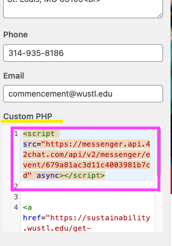
- Locate the Custom Code Field: Inside the Footer Settings, find the field specifically designated for custom code: “Custom PHP.”
- Identify the Target Code: Carefully examine the code currently in the field. Locate the exact block of code that includes the text: messenger.api.42chat.com.
Example of what to look for:
Replace only the target code:
- Select only the code block you identified in the previous step (e.g., from to or just the part itself).
- Be very careful not to delete or alter any other code that might be present in the Custom PHP field if it’s unrelated to the chatbot (e.g. the sustainability logo).
- Delete the selected code block.
- Paste your new code snippet into the exact spot where the old code was.
Publish changes
- Click the “Publish” button at the top of the Customizer panel to make your changes live.
- Verify: Open your website in a new browser tab (or clear your cache and refresh) and check if the new script is working as expected and that the old chatbot feature is gone.