
The Global home page sets the tone for visitor’s web experience. The page displays scannable content, making top resources quickly accessible and sharing various aspects of the WashU global story.
To edit a page, consult the Pages Tutorial.
Text home feature
Within the Photo Home Feature block, the hero text and image work together to send a clear message to site visitors about the vision for global activities at WashU and the purpose of this website.
At time of launch, there were three separate photos.
Intro paragraph
This Paragraph block, set in the lead format, explains to visitors what WashU global is and does.
Top resources
Using the Icon List Block, we pulled out the most used resources on the site to quickly get users to the information they are looking for.
In the World and In St. Louis
Both are made using a 50/50 Column block. In the first section “In the World”, the left column starts with a Heading block with an accent color underline for the name of the section (in this case, yellow). A Paragraph block then captures the rest of the copy. That column ends with the Icon List block, which stacks vertically in columns. These icons lead visitors into important pages pertaining to the topic.
The right column consists of a Social Feature block, which highlights a featured story for the topic of the section.
There is then a Spacer block, and then another 50/50 Column block is added for the following section, “In St. Louis.” The blocks in these columns are the same, but switched, so that the Social Feature block is on the left, and the other blocks are on the right.
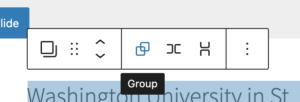
To get the gray background behind both of these sections, select all the blocks in these sections, and then in the floating block editor, choose the Group icon.
In the block editor for this new Group block, there is an option to add a gray background.
Impact preview
This area displays highlights from the Global Database and encourages visitors to click through to view all the data in the map on that page.
This area uses the By the Numbers block with the previous fiscal year’s data.
To edit the red call to action, refer to the Button block tutorial.
Featured video
The purpose of this block is to display a video spotlight with a call to action linking to Global Partnerships. The video illustrates our global partnerships in action. At launch, this area uses the Wide media spotlight block.
To update the video, click anywhere within the block then navigate to the sidebar and paste the video’s url in the field labeled YouTube or Vimeo video URL.
The Button block can be updated by clicking in the button text.
Explore regions
The purpose of this section is to end with a strong visual and invite users to explore the regions content. This is achieved with a Cover block.