The purpose of this content type is to showcase startups with WashU DNA.
Startups are featured in several places on the site:
- In the featured highlight area on the home page
- In the featured highlight area on the Innovations page
- In an alphabetical list of Startups in the Innovation page
Sectors
Startups are labeled with Sectors.
Startup components
- Title
- Excerpt
- Find out more link
- Sector
- Map coordinates
- Image (optional)
How to add a Startup
- Navigate to the Startup section of the dashboard
- Select Add New
- Fill out the fields in the Startup Editor
- Click Publish in the right sidebar
How to add coordinates to a Startup
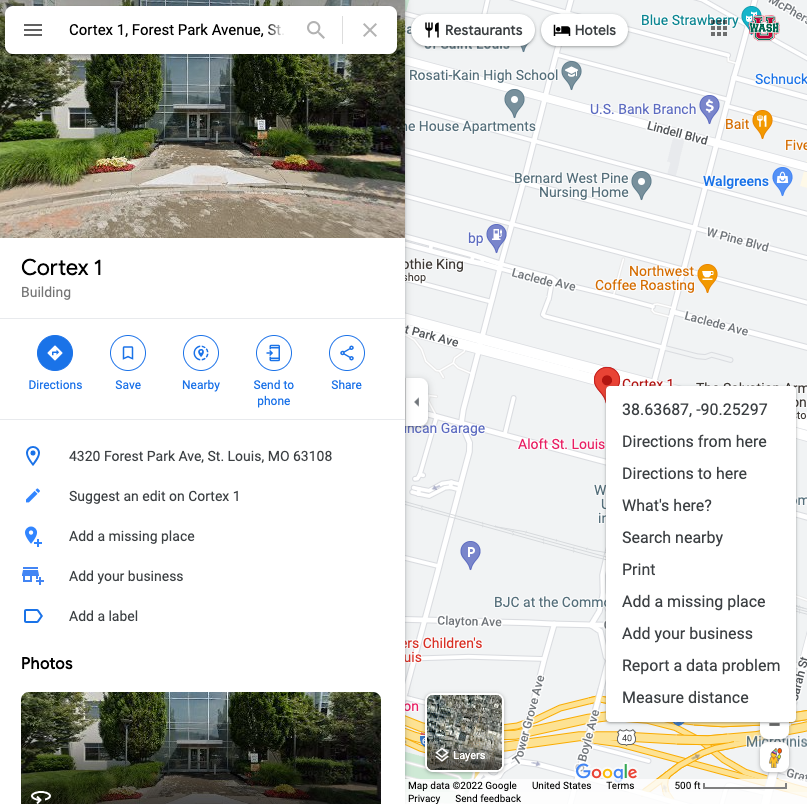
Use Google Maps to find the coordinates:
- Enter the address into Google Maps
- Right Click on the location pin. A pop-up window will appear that includes the coordinates.
- Copy and paste the coordinates into the Latitude and Longitude fields in the Startup Editor.